Free tool
VPC subnet planner for AWS, Azure and Google Cloud
Pick AWS, Azure or Google Cloud, enter the VPC address space and choose your tiers and availability zones. The planner splits the space into public, data and private subnets, applies the reserved-address rule of that cloud, flags overlaps and writes Terraform you can copy. Draw the plan as a diagram or open it in Archboard.
No problems: every subnet fits in the VPC and none overlap.
| Name | Tier | Zone | CIDR | Size | Usable in AWS | Actions |
|---|---|---|---|---|---|---|
| Public | us-east-1a | 4,091 | ||||
| Public | us-east-1b | 4,091 | ||||
| Public | us-east-1c | 4,091 | ||||
| Private | us-east-1a | 4,091 | ||||
| Private | us-east-1b | 4,091 | ||||
| Private | us-east-1c | 4,091 | ||||
| Data | us-east-1a | 4,091 | ||||
| Data | us-east-1b | 4,091 | ||||
| Data | us-east-1c | 4,091 |
Free ranges in the VPC
- 10.0.144.0 to 10.0.255.255 (28,672 addresses)
Resource blocks: 10. Zone names follow the region-plus-letter pattern; some regions use other letters, so check them in your account.
Terraform
provider "aws" {
  region = "us-east-1"
}

resource "aws_vpc" "app_vpc" {
  cidr_block           = "10.0.0.0/16"
  enable_dns_hostnames = true

  tags = {
    Name = "app-vpc"
  }
}

resource "aws_subnet" "public_a" {
  vpc_id                  = aws_vpc.app_vpc.id
  cidr_block              = "10.0.0.0/20"
  availability_zone       = "us-east-1a"
  map_public_ip_on_launch = true

  tags = {
    Name = "public-a"
    Tier = "public"
  }
}

resource "aws_subnet" "public_b" {
  vpc_id                  = aws_vpc.app_vpc.id
  cidr_block              = "10.0.16.0/20"
  availability_zone       = "us-east-1b"
  map_public_ip_on_launch = true

  tags = {
    Name = "public-b"
    Tier = "public"
  }
}

resource "aws_subnet" "public_c" {
  vpc_id                  = aws_vpc.app_vpc.id
  cidr_block              = "10.0.32.0/20"
  availability_zone       = "us-east-1c"
  map_public_ip_on_launch = true

  tags = {
    Name = "public-c"
    Tier = "public"
  }
}

resource "aws_subnet" "private_a" {
  vpc_id            = aws_vpc.app_vpc.id
  cidr_block        = "10.0.48.0/20"
  availability_zone = "us-east-1a"

  tags = {
    Name = "private-a"
    Tier = "private"
  }
}

resource "aws_subnet" "private_b" {
  vpc_id            = aws_vpc.app_vpc.id
  cidr_block        = "10.0.64.0/20"
  availability_zone = "us-east-1b"

  tags = {
    Name = "private-b"
    Tier = "private"
  }
}

resource "aws_subnet" "private_c" {
  vpc_id            = aws_vpc.app_vpc.id
  cidr_block        = "10.0.80.0/20"
  availability_zone = "us-east-1c"

  tags = {
    Name = "private-c"
    Tier = "private"
  }
}

resource "aws_subnet" "data_a" {
  vpc_id            = aws_vpc.app_vpc.id
  cidr_block        = "10.0.96.0/20"
  availability_zone = "us-east-1a"

  tags = {
    Name = "data-a"
    Tier = "data"
  }
}

resource "aws_subnet" "data_b" {
  vpc_id            = aws_vpc.app_vpc.id
  cidr_block        = "10.0.112.0/20"
  availability_zone = "us-east-1b"

  tags = {
    Name = "data-b"
    Tier = "data"
  }
}

resource "aws_subnet" "data_c" {
  vpc_id            = aws_vpc.app_vpc.id
  cidr_block        = "10.0.128.0/20"
  availability_zone = "us-east-1c"

  tags = {
    Name = "data-c"
    Tier = "data"
  }
}
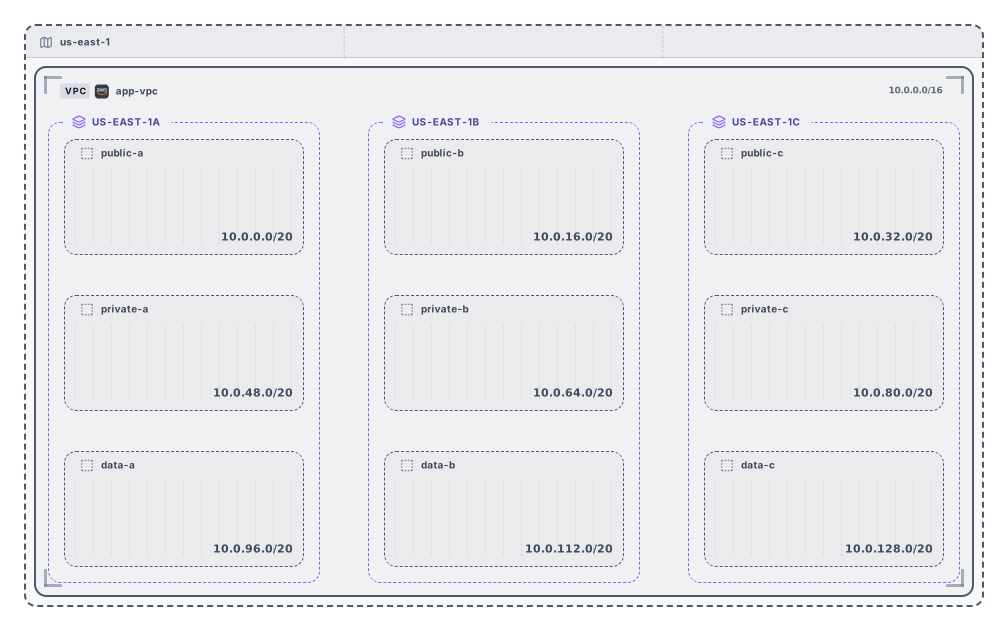
Diagram preview
Example output
How it works
Choose a cloud and an address space
Pick AWS, Azure or Google Cloud, type the VPC block, for example 10.0.0.0/16, and select the tiers. On AWS, also pick how many availability zones to use.
Adjust the suggested plan
Rename subnets, change their size or CIDR, remove rows or add new ones. Problems are marked on the row and in the summary.
Copy the Terraform or open the diagram
Copy the code or download it as main.tf, download the diagram as SVG or PNG, or open it in Archboard to keep working. Signing up takes a Google or GitHub account.
What the VPC subnet planner gives you
- A suggested layout that cuts the address space into equal blocks, one for each tier in each zone, with names such as public-a or data-c that show the tier and the zone letter.
- Usable hosts for every subnet under the rule of the chosen cloud: AWS and Azure keep 5 addresses of each subnet, Google Cloud keeps 4.
- Overlapping subnets, subnets outside the VPC, duplicate names and sizes the cloud doesn’t accept, marked on the row and counted in a summary above the table.
- The free ranges left in the VPC once every subnet is placed, with their size, so you know where a new subnet can go.
- Terraform for the plan: aws_vpc and aws_subnet with zones and tier tags, azurerm_virtual_network and azurerm_subnet, or google_compute_network and google_compute_subnetwork.
- A diagram of the plan with the region, the VPC and, on AWS, one frame per availability zone holding its subnets. Download it as SVG or PNG with an Archboard watermark.
How AWS, Azure and Google Cloud differ
AWS reserves the first four addresses and the last address of every subnet and accepts subnets from /16 to /28. Azure also reserves five addresses and accepts subnets up to /29; its plan has no zones, because a VNet subnet spans the region. Google Cloud reserves four addresses and accepts subnets up to /29, and its network holds no range of its own: each subnet carries its range in the region.
Availability zone names on AWS
Zones are named from the region and a letter, us-east-1a, us-east-1b and so on, up to six zones. Not every region has six zones, some skip letters, and each account can map letters to different physical zones, so check the zone names in your account before you apply the Terraform code.
What the VPC planner leaves out
- IPv6 subnets. The planner works on IPv4 address spaces; the calculator describes IPv6 blocks.
- Route tables, internet and NAT gateways, network security groups and firewall rules. The Terraform covers the network and its subnets only.
- Peering, transit gateways or several VPCs at once. Each plan is one VPC, VNet or network.
- Reading an existing network from your account. To draw a VPC you already run, paste its Terraform into the Terraform to diagram tool instead.
VPC subnet planning questions
How large should the VPC address space be?
Leave room to grow. A /16 gives 65,536 addresses and is a common choice on AWS, where the VPC block can be /16 to /28. Pick a range that doesn’t overlap your other VPCs or your office network, so that peering or a VPN can work later.
Why does the planner make every subnet the same size?
Equal blocks keep the layout easy to read and leave the same room in every zone. After that, change the size of any row: the summary flags an overlap the new size causes, and the list of free ranges shows the space you have left.
Can I apply the Terraform code as it is?
Treat it as a starting point. It declares the provider, the network and every subnet with its CIDR and, on AWS, its zone and a tier tag; on Azure it reads the resource group from a variable. Add your route tables, gateways and firewall rules, check the zone names, then run terraform plan before you apply.
What happens when I open the plan in Archboard?
Nothing on this page is saved. When you select Open in Archboard, the diagram you see, with its region, VPC, zones and subnets, is saved as a new diagram in your workspace, where you can rearrange, annotate, share or export it. It’s a starting point: later changes on this page don’t update it.
Is the VPC subnet planner free?
Yes. Planning, checking and copying the Terraform need no account, and neither does downloading the diagram as SVG or PNG. Opening the plan in Archboard needs a free account.
Open a canvas in a minute
Sign in with Google or GitHub. Free for a single seat. Upgrade when the team joins.