Free tool
ER diagram generator
Paste a database schema in any of four common forms, SQL DDL, a Prisma schema, DBML, or a Mermaid erDiagram, and get an ER diagram online that you can edit. One text box takes all four: the format is recognized from the text, so there’s nothing to choose first. No install and no sign-up to try it.
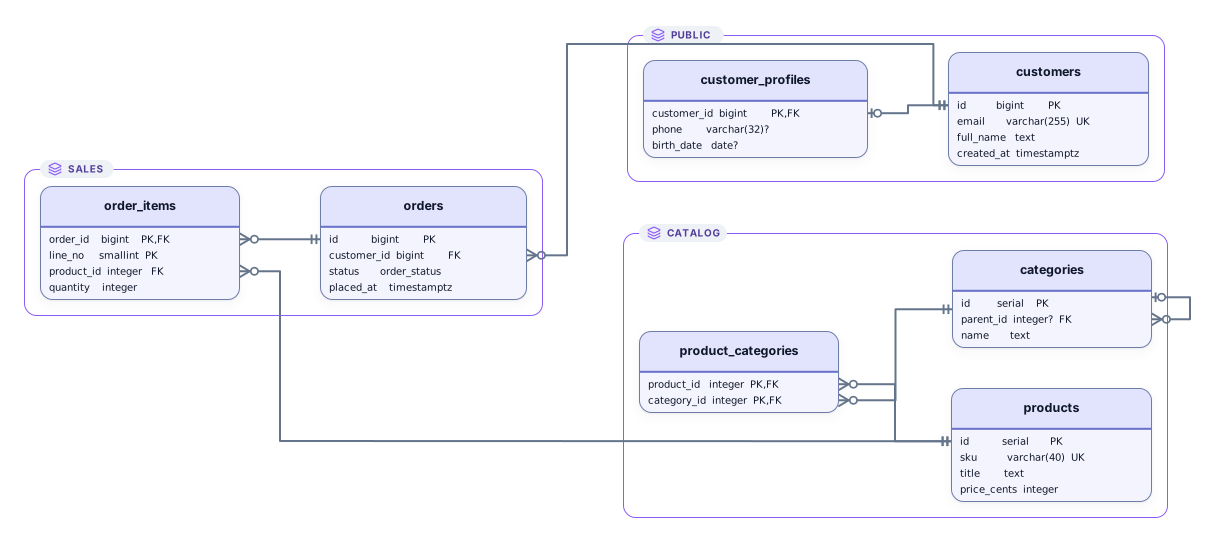
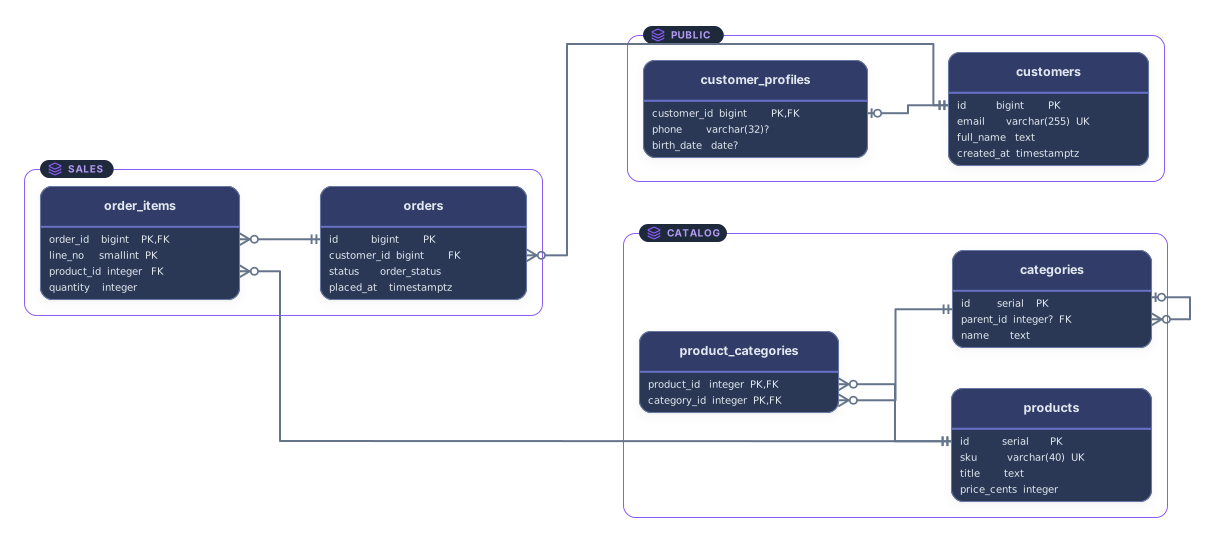
Example output
How it works
Paste or drop your schema
CREATE TABLE statements, a schema.prisma file, DBML, or a Mermaid erDiagram block. The format is recognized from the text itself, so you don’t pick it first.
See the ER diagram
Tables, models, and entities become cards that list their columns, and every relationship becomes a line between the tables it joins.
Open it in Archboard
Save it as a new diagram to rearrange, annotate, share a link, or export SVG and PNG. Signing up takes a Google or GitHub account.
What’s drawn from each format
Each format adds its own parts to the same kind of ER diagram:
CREATE TABLEALTER TABLESQL DDL: every CREATE TABLE as a card with one row per column, showing the column’s name and type, and a question mark on columns that allow NULL. Statements further down the script, such as ALTER TABLE, are applied to the tables they change.
PRIMARY KEYUNIQUEKeys in SQL: a primary key puts PK on each column it covers, so a composite key is marked on all of its columns, and a UNIQUE constraint on a single column marks that column UK.
FOREIGN KEYREFERENCESForeign keys in SQL, whether written inline with REFERENCES or added later by ALTER TABLE, each drawn as a line from the referencing column to the key it points at. A table that refers to itself, such as a category with a parent_id, gets its line too.
model@relationPrisma: each model as a card whose rows are its scalar fields with their Prisma types, enum fields among them. A relation field isn’t a row of its own; the link it describes in its relation attribute is drawn as a line instead.
TableRefDBML: each Table as a card, with a question mark on columns that aren’t set to not null and aren’t part of a primary key. Short names declared with as are resolved, so a Ref that uses an alias still joins the right columns.
erDiagramMermaid erDiagram: each entity as a card listing its attributes with their types and PK, FK, and UK markers, and each relationship as a line that keeps its label and cardinality, such as one customer placing zero or more orders.
Which page fits your schema
This page is the database diagram tool for when you have a schema in hand and don’t want to think about its format. If you always work with one format, its own page goes deeper: the SQL pages explain dump commands and the syntax of each dialect, the Prisma page explains multi-file schemas and implicit many-to-many relations, and the DBML page explains table groups and partials. The same parsers draw the diagram on every one of these pages.
What this page doesn’t read
- Mermaid flowcharts and the other Mermaid diagram types. Only erDiagram blocks are read here; a flowchart is reported as not recognized, and the Mermaid page draws it instead.
- Rows of data. INSERT statements and DBML Records blocks are skipped, so the diagram shows how the tables are built, not what they contain.
- A running database. Nothing connects to a server: the diagram comes only from the text in the box, so it shows the schema as written, not row counts or what is deployed.
- Formats beyond these four. Terraform, Kubernetes YAML, Docker Compose, and CI pipelines aren’t read on this page; the free tools hub reads every supported format in one box.
ER diagram generator questions
Which formats can I paste?
SQL DDL, a Prisma schema, DBML, and Mermaid erDiagram code. Paste the text or drop a .sql, .prisma, .dbml, or .mmd file. When the text matches none of them, the tool says so and shows a list of the four formats; choose one and it tries to read the text that way.
How does DDL to ER diagram work here?
Paste CREATE TABLE statements, for example a migration file, the SQL an ORM generates, or a schema-only dump, and the tables are drawn with their keys and foreign keys. Views, procedures, and INSERT rows are left out. The PostgreSQL, MySQL, SQL Server, and SQLite pages list which statements of each dialect are read.
How is the format detected?
From the text itself. Clues such as CREATE TABLE, a model block with Prisma attributes, Table and Ref lines, or an erDiagram header each point to one format, and nothing has to be selected before pasting. When the clues fit none of the four formats, nothing is drawn and the format list appears.
Do I need to say which SQL dialect it is?
No. PostgreSQL, MySQL and MariaDB, SQL Server, and SQLite scripts are told apart by their quoting and statement separators, and Oracle is read in part. Anything else is read as standard SQL.
What’s saved when I open the diagram in Archboard?
The preview isn’t saved. When you select Open in Archboard, the drawn diagram, with its table cards, column names and types, and relationship lines, is saved as a new diagram in your workspace, whichever of the four formats it came from. Later edits to the schema don’t update it.
Is the ER diagram generator free?
Yes. Pasting a schema and viewing the ER diagram need no account. Opening the diagram in Archboard needs a free account.
Open a canvas in a minute
Sign in with Google or GitHub. Free for a single seat. Upgrade when the team joins.