Free tool
SQL to ER diagram
Paste CREATE TABLE statements or a dump of a whole database schema and get an ER diagram: every table with its columns and keys, and a line for every foreign key. The SQL dialect is detected for you, covering PostgreSQL, MySQL and MariaDB, SQL Server, SQLite, and Oracle in part. No account needed to try it.
Example output
How it works
Paste or drop your SQL
CREATE TABLE statements, a migration file, or a full dump from pg_dump, mysqldump, SSMS, or sqlite3. Several .sql files can be dropped at once and are read together, up to 8 MB in all.
See the ER diagram
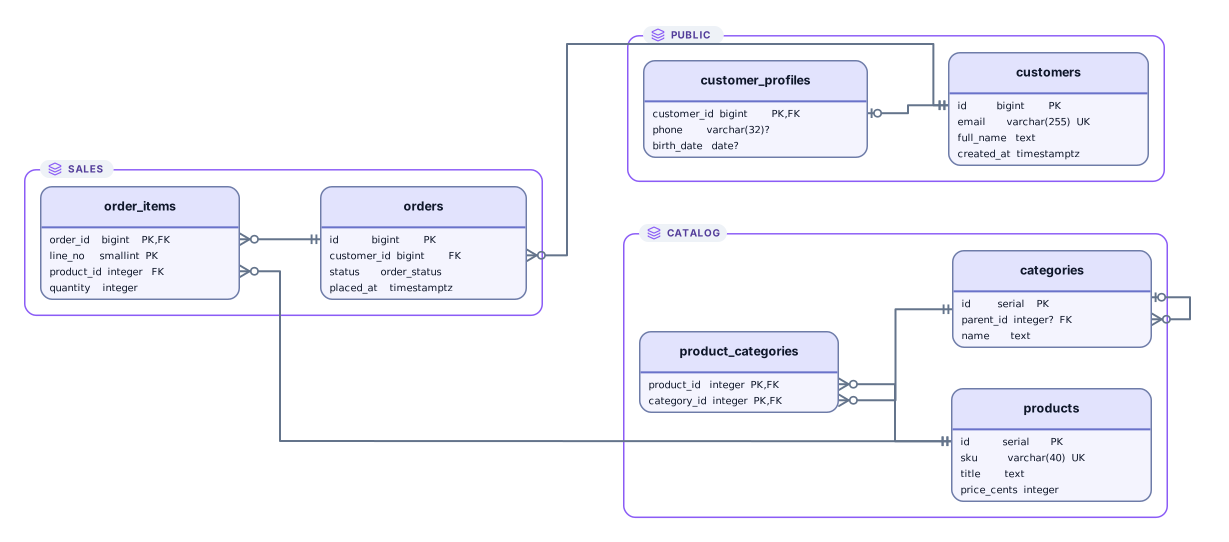
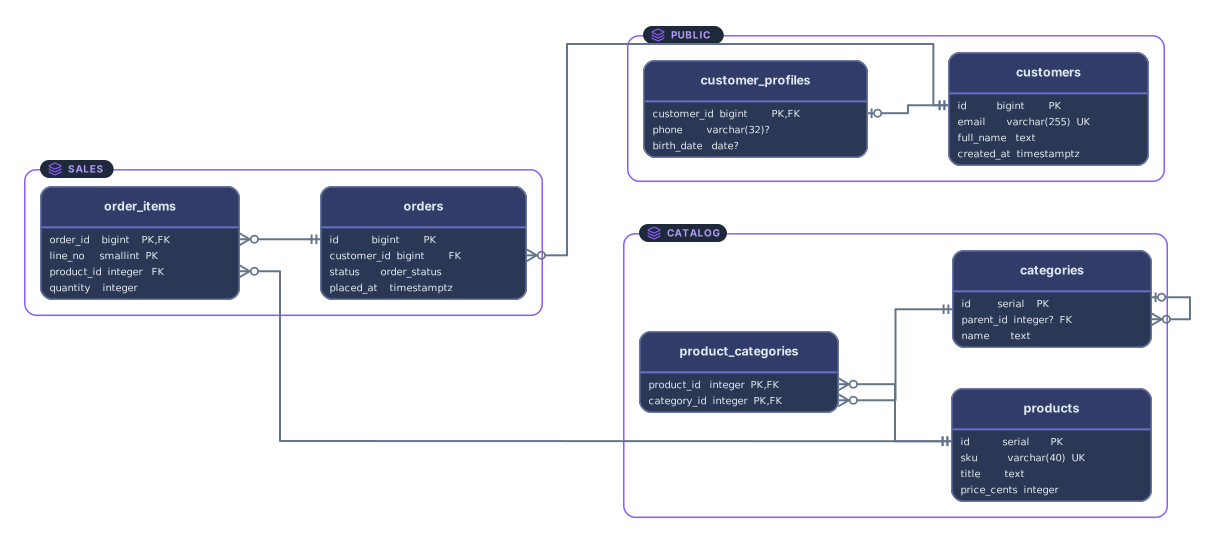
Each table becomes a card that lists its columns with their types and PK, FK, and UK markers. Each foreign key becomes a line from the column that holds it to the key it points to.
Open it in Archboard
Save it as a new diagram to rearrange, annotate, share a link, or export SVG and PNG. Signing up takes a Google or GitHub account.
What’s drawn from your SQL
The diagram is built from these parts of the CREATE TABLE statements:
CREATE TABLEEvery CREATE TABLE as a card named after the table, with one row per column: its name, its type, and a question mark when it allows NULL. Cards show up to 24 columns, then a count of the rest.
PRIMARY KEYUNIQUEPrimary keys, marked PK on every column they cover, even when they span several. A UNIQUE constraint, or a unique index made with CREATE UNIQUE INDEX, on a single column marks that column UK.
FOREIGN KEYREFERENCESALTER TABLEForeign keys written inline with REFERENCES, as table constraints, or added afterwards with ALTER TABLE, each drawn as a line between the two columns. A key that points back to its own table, such as parent_id, is shown as well.
CREATE SCHEMASchemas, whether created with CREATE SCHEMA or written in names such as sales.orders, drawn as frames around their tables when the SQL uses more than one. A schema with no tables gets no frame.
NOT NULLUNIQUECrow’s foot ends that read the relationship from the columns: a NOT NULL foreign key is required, a nullable one is optional, and a foreign key that is also unique or the primary key makes the relationship one-to-one.
SQL dialects it reads
PostgreSQL, MySQL and MariaDB, SQL Server, and SQLite are each read with their own quoting, comments, and statement separators, so a pg_dump file, a mysqldump with DELIMITER blocks, or an SSMS script full of GO lines works as it is. Oracle is read in part: tables, keys, and foreign keys are drawn, and PL/SQL blocks that end with a slash line are skipped. When the clues are mixed, a generic reader takes over, and you can pick the dialect yourself at any time.
What the ER diagram leaves out
- Rows of data. INSERT, COPY, and other data statements are skipped without being read, so a dump with data gives the same diagram as a schema-only one.
- Views, functions, procedures, triggers, and sequences. They’re skipped, and the preview tells you how many of each were left out; the views and triggers that mysqldump writes inside version comments are skipped as comments and not counted.
- Default values, CHECK expressions, comments, and the allowed values of ENUM and SET columns. Columns show their name, type, and key markers only.
- Anything from a running server. The tool reads the SQL text you give it and doesn’t connect to a database, so row counts, table sizes, and query plans aren’t shown.
SQL to ER diagram questions
Which SQL dialects are supported?
PostgreSQL, MySQL and MariaDB, SQL Server, and SQLite, with Oracle in part. The dialect is detected from clues such as backticks, GO lines, or dollar quoting, and the preview names the dialect it used. If the guess is wrong, choose another one from the list and it stays selected. For other databases, a generic reader handles standard CREATE TABLE and ALTER TABLE statements.
Can I paste a full dump with data in it?
Yes. INSERT and COPY statements are skipped unread, along with SET lines, comments, and other dump noise, so the diagram comes out the same as from a schema-only dump. A schema-only dump is smaller and faster to read, though: pg_dump --schema-only, mysqldump --no-data, or sqlite3 with .schema.
How large a schema can it handle?
Up to 8 MB of SQL and 1,000 tables. Text over 2 MB isn’t shown in the text box but is still read. The diagram itself holds up to 2,000 elements, counting tables, lines, and schema frames together, so a densely linked schema can reach that limit first; dumping one schema at a time helps.
Does it work with Oracle?
In part. Oracle scripts, such as those from SQL Developer, are recognized by VARCHAR2, NUMBER, and slash lines, or you can choose Oracle in the dialect list. CREATE TABLE, primary keys, unique constraints, and foreign keys added with ALTER TABLE are drawn. PL/SQL packages, triggers, and other blocks that end with a slash line are skipped, as are CONNECT and GRANT statements.
What’s saved when I open the diagram in Archboard?
The preview isn’t saved. When you select Open in Archboard, the drawn diagram, meaning the table cards with their column names and types and the lines between them, is saved as a new diagram in your workspace. It’s a snapshot: later changes to the schema don’t update it.
Is the SQL to ER diagram tool free?
Yes. Pasting SQL and viewing the diagram need no account. Opening the diagram in Archboard needs a free account.
Open a canvas in a minute
Sign in with Google or GitHub. Free for a single seat. Upgrade when the team joins.