Free tool
MySQL and MariaDB to ER diagram
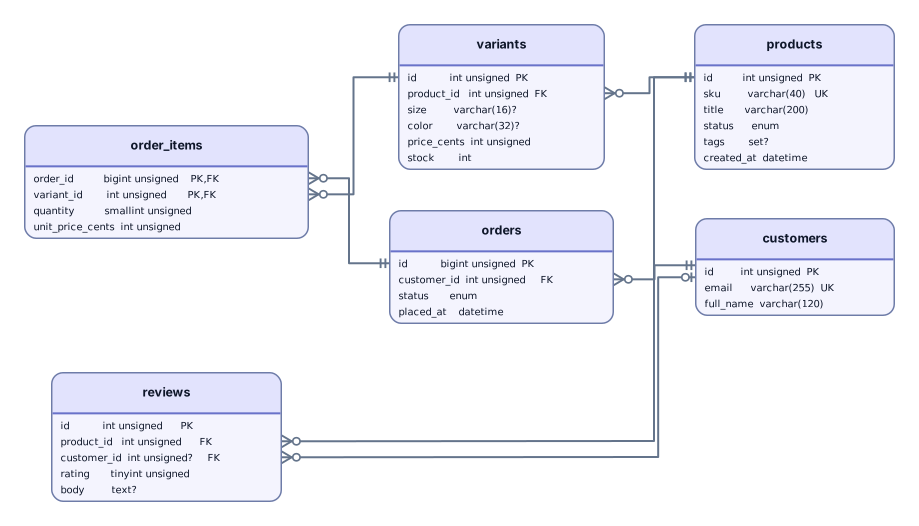
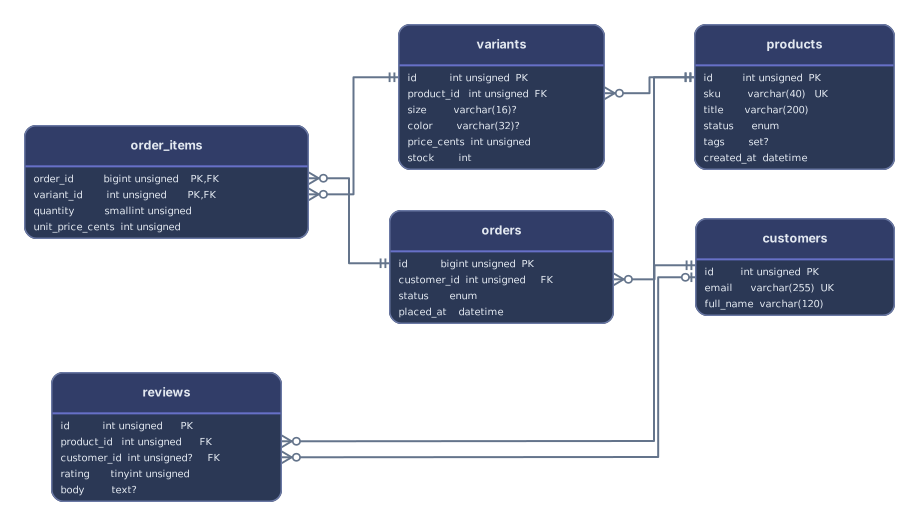
Paste a mysqldump file or a MySQL Workbench script, with its backticks, ENGINE options, and version comments, and get an ER diagram of the tables and foreign keys. MariaDB dumps read the same way. Try the storefront sample with products, variants, orders, and reviews.
Example output
How it works
Paste or drop your MySQL dump
Output from mysqldump or mariadb-dump, an export from Workbench or phpMyAdmin, or the CREATE TABLE text that SHOW CREATE TABLE prints.
See tables and their links
Each table becomes a card with its columns and keys. Foreign keys, whether declared as constraints or written inline with REFERENCES, become lines between the matching columns.
Open it in Archboard
Save it as a new diagram to rearrange, annotate, share a link, or export SVG and PNG. Signing up takes a Google or GitHub account.
Get the database schema out of MySQL
Run this, then paste schema.sql or drop the file:
--no-data leaves out the rows, while --skip-comments and --compact strip the comment header and the DROP TABLE, LOCK TABLES, and SET NAMES lines. Replace mydb with the database name and add -u and -p as needed. On MariaDB, mariadb-dump takes the same options.
mysqldump --no-data --skip-comments --compact mydb > schema.sql
MySQL syntax in a dump
How each construct in a mysqldump file is handled:
`order_items`- Read. Names in backticks match the same names written without them, and double-quoted names work too when the dump sets ANSI_QUOTES.
ENGINE=InnoDB- Skipped together with DEFAULT CHARSET, COLLATE, and the other table options; the table itself is read.
AUTO_INCREMENT- Not shown: the column keeps its type, such as INT UNSIGNED. The AUTO_INCREMENT counter written after the table is ignored as well.
REFERENCES products (id)- Drawn as a relationship. MySQL before 9.0 accepts this inline form without enforcing it, so the preview adds a note when it sees one.
KEY idx_name (name)- A plain index, so it adds no marker. UNIQUE KEY marks UK, and KEY written right after a column means primary key, as it does in MySQL.
/*!40101 … */- Treated as comments and skipped, including the SET wrappers that mysqldump writes around each table.
DELIMITER ;;- Understood: procedures and functions between DELIMITER lines are skipped whole and counted, and the tables after them are still read. The triggers and events that mysqldump puts there are wrapped in version comments, so they’re skipped as comments.
ENUM (…) · SET (…)- Shown as the column types enum and set; the allowed values aren’t listed.
What a MySQL diagram leaves out
- Stored procedures, functions, triggers, and events, none of which are drawn. Procedures and functions are counted in the preview; the triggers and events that mysqldump writes inside version comments are skipped as comments.
- Whatever sits inside version comments such as /*!50100 PARTITION BY … */. The text counts as a comment, so partitioning and other version-gated options don’t show up.
- Rows from extended INSERT statements. They’re skipped unread, even when a single INSERT line runs to several megabytes.
- Anything from a running MySQL or MariaDB server. No connection is made, so row counts, table sizes, and server settings aren’t shown.
MySQL and MariaDB questions
Which mysqldump command works best?
mysqldump --no-data --skip-comments --compact mydb > schema.sql gives just the CREATE TABLE statements, without rows or the lines that wrap them. A full dump works too: the INSERT statements are skipped, so the diagram is the same, only the file is bigger.
Does it work with MariaDB?
Yes. MariaDB writes the same dump format, so choose MySQL / MariaDB or let detection pick it. Output from mariadb-dump, backtick names, and AUTO_INCREMENT read just like MySQL’s, and inline REFERENCES are drawn as relationships whichever server wrote the file.
Why does an inline REFERENCES get a note?
In MySQL 8 and earlier, REFERENCES written right after a column is accepted but ignored: no foreign key is created. MySQL 9.0 and later create it. The diagram draws the relationship either way, since the script states it, and the note is a reminder to check whether the database really has that key.
Can I paste Workbench scripts or migrations instead of a dump?
Yes. A forward-engineered script from MySQL Workbench, a Laravel schema dump, a Rails structure.sql, or hand-written DDL all work. Statements that change tables later, such as ALTER TABLE … ADD CONSTRAINT … FOREIGN KEY or ADD COLUMN, are applied to the tables they name.
Is anything saved when I paste a MySQL dump?
The preview isn’t saved. When you select Open in Archboard, the drawn diagram, with its table cards, column names and types, and relationship lines, is saved as a new diagram in your workspace. Changes made to the MySQL schema later don’t update it.
Is the MySQL ER diagram tool free?
Yes. Pasting a dump and viewing the diagram need no account. Opening the diagram in Archboard needs a free account.
Open a canvas in a minute
Sign in with Google or GitHub. Free for a single seat. Upgrade when the team joins.