Free tool
SQLite to ER diagram
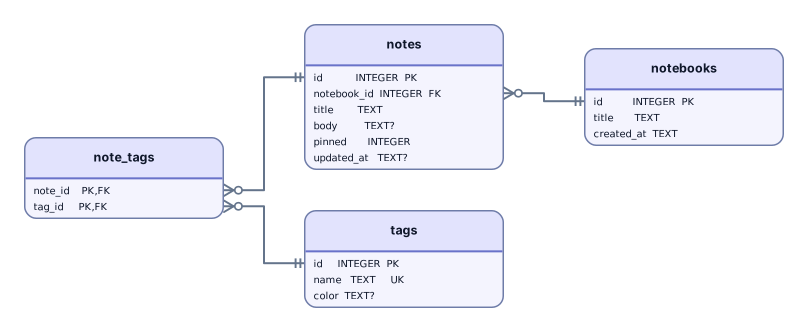
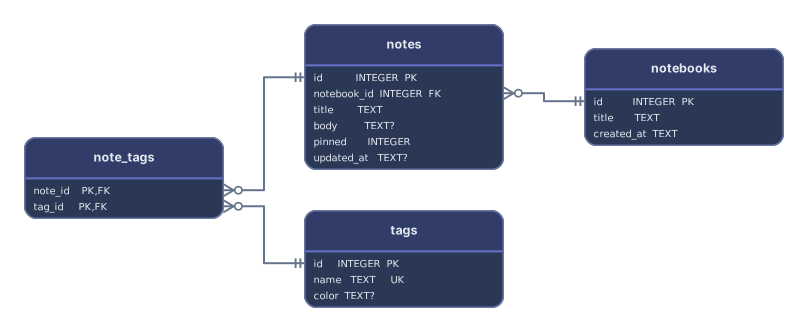
Paste what sqlite3 prints for .schema or .dump and get an ER diagram of the tables, keys, and foreign keys, untyped columns included. Try the notes app sample: notebooks, notes, tags, and the table that links notes to tags.
Example output
How it works
Paste or drop the schema
The output of .schema or .dump, a migration file written in SQL, or CREATE TABLE statements copied from any SQLite tool.
See the tables and links
Each table becomes a card with its columns, and every REFERENCES clause becomes a line to the table it points to, whether or not foreign keys are switched on.
Open it in Archboard
Save it as a new diagram to rearrange, annotate, share a link, or export SVG and PNG. Signing up takes a Google or GitHub account.
Get the database schema out of a SQLite file
Run this next to the database file and paste what it prints:
.schema prints every CREATE statement without the rows; .dump prints the same plus the data, which is skipped. Replace app.db with the file name, or add > schema.sql to save the output and drop that file instead.
sqlite3 app.db .schema
SQLite syntax in a schema
How each construct in sqlite3 output is handled:
INTEGER PRIMARY KEY- Marked PK. This column is the table’s rowid, and other tables can point to it with REFERENCES.
AUTOINCREMENT- Read as part of the primary key and not shown. SQLite spells it without an underscore, unlike MySQL’s AUTO_INCREMENT.
CREATE TABLE note_tags (note_id, tag_id)- Read. A column declared without a type is shown with its name and no type, and keys on it still count.
WITHOUT ROWID · STRICT- Skipped as table options; the table, its columns, and its primary key are read as usual.
sqlite_sequence- Hidden. SQLite creates this table for AUTOINCREMENT and .schema prints it, but it isn’t part of the app’s design; a .dump only fills it with INSERT lines, which are skipped.
CREATE TRIGGER- Skipped and counted. The semicolons inside BEGIN … END are handled, so tables after a trigger are still read.
What a SQLite diagram leaves out
- Triggers and views. Their bodies are skipped and counted, so nothing they do shows up on the diagram.
- SQLite’s own bookkeeping tables, such as sqlite_sequence and sqlite_stat1. Anything whose name starts with sqlite_ is hidden.
- Whether foreign keys are enforced. PRAGMA foreign_keys is off by default in SQLite, and the diagram draws every declared REFERENCES regardless of that setting.
- The database file itself. A .db file can’t be opened here, so page size, row counts, and stored rows aren’t shown; paste the .schema text instead.
SQLite questions
.schema or .dump: which one should I use?
.schema is shorter because it prints only the CREATE statements. .dump adds every row as INSERT statements between BEGIN TRANSACTION and COMMIT, which works too, since the rows are skipped. To print a single table, give .schema its name, as in .schema notes.
Why do some columns have no type?
SQLite lets a column be declared without a type, as in CREATE TABLE note_tags (note_id, tag_id). The diagram shows such a column with its name and an empty type. In a STRICT table every column has a type, and it’s shown as written.
Why are there no lines between my tables?
Lines come from REFERENCES clauses and FOREIGN KEY constraints. Many apps never declare them and just store ids, which leaves nothing to draw. Once the schema declares them, the lines appear whether or not PRAGMA foreign_keys is on.
Can I diagram the SQLite database of a mobile app?
Yes. Copy the database file from the device or emulator to your computer, run sqlite3 app.db .schema, and paste the output. The same works for desktop apps, Electron apps, and local Django or Rails development databases.
Is anything saved when I paste a schema?
The preview isn’t saved. When you select Open in Archboard, the drawn diagram, with its table cards, column names and types, and lines, is saved as a new diagram in your workspace. Later changes to the .db file don’t update it.
Is the SQLite ER diagram tool free?
Yes. Pasting a schema and viewing the diagram need no account. Opening the diagram in Archboard needs a free account.
Open a canvas in a minute
Sign in with Google or GitHub. Free for a single seat. Upgrade when the team joins.