Free tool
Mermaid viewer for README, docs and AI code
Paste Mermaid code from a README, a docs page or an AI answer, select Visualize, and read it as a finished diagram. The viewer renders flowcharts, sequence and class diagrams and erDiagram schemas on a preview you can zoom and enlarge. No account needed.
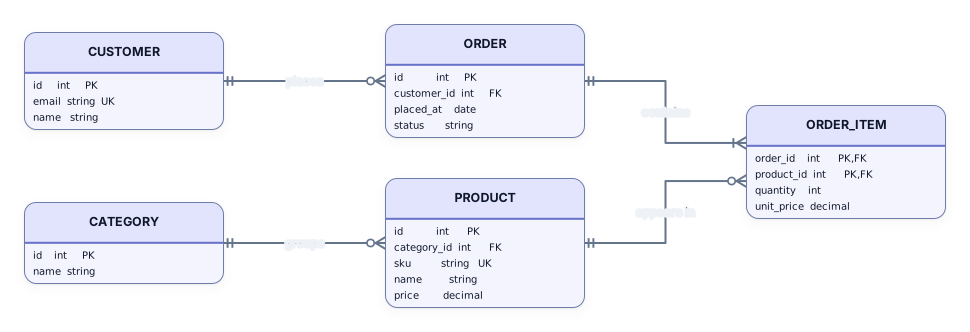
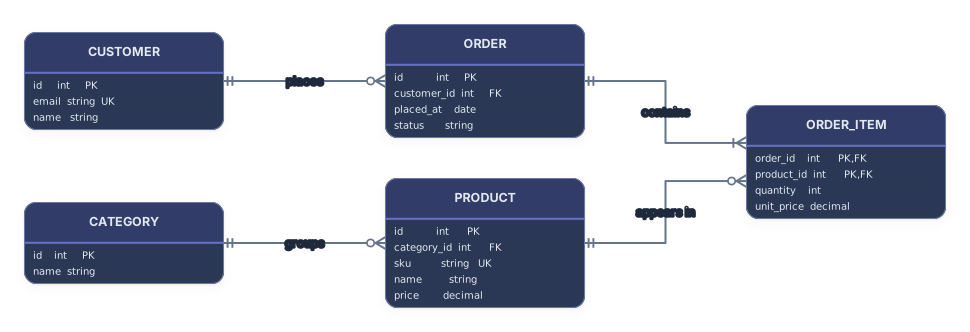
Example output
How it works
Paste or open your Mermaid code
Paste code from a Markdown file, a README or an AI chat, or choose a .mmd file. A mermaid code fence around it is fine.
Select Visualize
The preview draws nodes, arrows, frames and tables. Zoom in, enlarge it, or download it as SVG or PNG.
Open it in Archboard
Save it as a new diagram to rearrange shapes, add notes and share a link. Signing up takes a Google or GitHub account.
What the Mermaid viewer shows
Each part of the code becomes something you can check on the preview:
A[Text]B{Text}Nodes with their text. Square brackets give a process box, curly braces a decision diamond, and stadium brackets the rounded start and end shapes.
-->|text|Arrow labels written between vertical bars, so a Yes or No branch reads the same way as in the source.
subgraphSubgraphs as titled frames around their nodes, so the stages of a long process stay together.
erDiagramerDiagram entities as tables that list every attribute with its type and its PK, FK or UK marker, joined by relationship lines that keep their labels.
sequenceDiagramSequence diagrams read top to bottom: one lifeline per participant and each message as a labeled arrow.
classDiagramClass diagrams as UML cards that list members, with arrowheads that tell inheritance from composition.
Diagram types this viewer renders
The viewer renders flowchart and graph diagrams, flowchart-elk included, sequenceDiagram and classDiagram code, and entity relationship diagrams written with erDiagram. When the code starts with another type, such as stateDiagram, gantt or pie, a message names that type and the supported ones instead of showing a half-drawn picture.
Mermaid code from docs, wikis and AI answers
Mermaid code turns up in Markdown docs, wiki pages, issue threads and replies from AI assistants such as ChatGPT or Claude. Paste it here to see what it describes before you commit it, to review a diagram a teammate sent, or to check that a generated flowchart says what you asked for. If the code has a syntax error, the message points to the line.
What the viewer doesn’t render
- State, Gantt, pie, mindmap, timeline and other diagram types: the viewer names the type instead of drawing it.
- Mermaid themes and init settings: a config block that picks the dark or forest theme is read past, and the diagram uses the Archboard look.
- Click actions and links on nodes: click lines are skipped, so nodes in the preview don’t open URLs or run callbacks.
- Updates on every keystroke: the preview redraws when you select Visualize again, so half-typed code never flashes an error.
Mermaid viewer questions
Can I paste a Mermaid block straight from a README?
Yes. Copy the whole block, the three backticks and the mermaid word included, and paste it as it is. The fence is ignored and the code inside is drawn, so you can check the structure of a diagram before it goes into a README or a pull request.
Can I open a .mmd file?
Yes. Choose a file that ends in .mmd or .mermaid, or drop it on the code box, and it is read the same way as pasted code. Only the text of the file is used.
Why does the diagram look different from the Mermaid renderer?
Archboard lays the diagram out itself and draws it with its own shapes and colors, so spacing, arrow routes and fonts differ from what Mermaid draws. Theme settings are skipped, and classDef or style lines are skipped and counted in the warnings. The nodes, labels, frames and tables all come from your code.
What happens when I open the diagram in Archboard?
The preview on this page isn’t saved. When you select Open in Archboard, the diagram you see, with its shapes, labels and connections, is saved as a new diagram in your workspace, where you can rearrange, annotate, share or export it. It’s a starting point: later changes to your Mermaid code don’t update it.
Is the Mermaid viewer free?
Yes. Viewing Mermaid code and downloading the preview needs no account. Opening it in Archboard needs a free account.
Related
- Mermaid to editable diagram: flowchart, sequence, class, ER
- Mermaid flowchart editor with syntax examples
- Mermaid to PNG converter
- Mermaid to SVG converter
- Sequence diagram generator from Mermaid code
- Class diagram generator from Mermaid code
- PlantUML editor and viewer, PlantUML to Mermaid
- SQL to ER diagram
- All free tools
- Diagram templates
- AI architecture diagram generator
Open a canvas in a minute
Sign in with Google or GitHub. Free for a single seat. Upgrade when the team joins.