Free tool
Docker Compose to Kubernetes converter
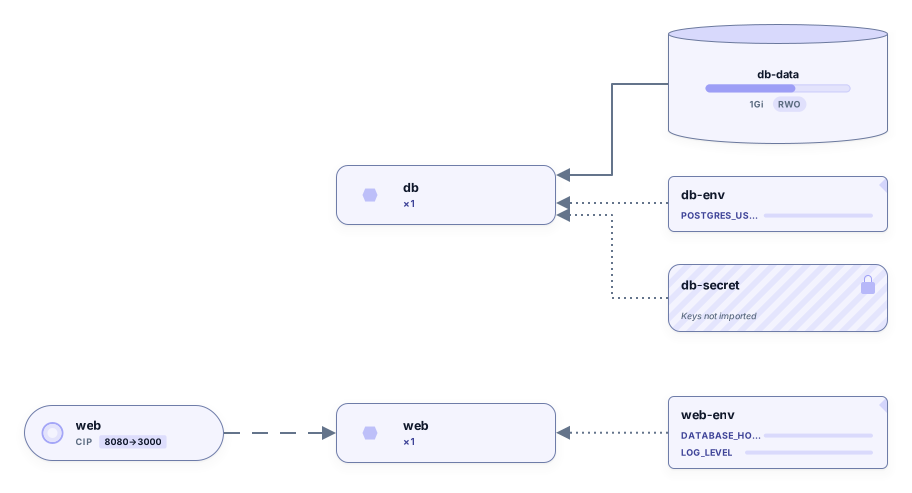
Paste a compose.yaml or docker-compose.yml and select Convert. Each service becomes a Deployment, published ports become Services, environment variables move into ConfigMaps and Secrets, and named volumes get a PersistentVolumeClaim. Review the YAML, download it as kubernetes.yaml, and see the result drawn as a Kubernetes diagram.
Example output
How it works
Paste your Compose file
Paste the whole file, anchors and extension fields included. Version lines and x- blocks are fine.
Select Convert and pick the values
Names only is the default and keeps every value out of the output. Switch to Keep values to copy values that don’t look secret.
Review, download or open it
Fill in the marked values, download kubernetes.yaml, or open the diagram in Archboard. Signing up takes a Google or GitHub account.
Which Kubernetes objects you get
- A Deployment per Compose service with its image, container ports, resource limits and the replica count from deploy.replicas. Labels and selectors use app: and the service name.
- A Service for every Compose service that publishes ports, with port set to the published port and targetPort to the container port. Each port gets a name such as tcp-8080.
- Environment variables split into a ConfigMap for plain settings and a Secret for names that look like passwords, tokens or keys. Top-level secrets become Secret objects with a placeholder value.
- A PersistentVolumeClaim for each named volume that is declared at the top level and used by a service, mounted at the same path in the container.
Treat the output as a first draft
The manifests are meant to be read and finished, not applied blindly. Secret values are written as REPLACE_ME, empty ConfigMap values carry a set value comment, and every volume claim asks for 1Gi with an adjust size comment. Health checks are marked as not converted, so probes, storage classes, ingress and namespaces are left to you, and the summary counts how many values still need filling in.
What the Compose to Kubernetes converter skips
- Helm charts, Kustomize overlays and templating: the output is one plain multi-document YAML file.
- Services for containers without published ports. A service that only uses expose or no ports at all gets no Service, and the warnings tell you which ones to add by hand if other services call them by name.
- Bind mounts, tmpfs mounts and anonymous volumes. They are counted in the warnings; no hostPath volume is created.
- Image builds and depends_on ordering. A service with only a build section gets a placeholder image name, and depends_on is marked as not converted above the Deployment.
Names only or Keep values
Names only copies variable names and leaves values, commands and entrypoints out, so a Compose file with real credentials never ends up in the output. Keep values copies plain values into the ConfigMap and moves command and entrypoint into args and command. Names that look like passwords, tokens or keys are written as REPLACE_ME in both modes.
Compose to Kubernetes questions
How many replicas does each Deployment get?
The replica count comes from deploy.replicas in the Compose file. A service without it gets one replica. CPU and memory limits from deploy.resources are carried over, with memory units such as 512m turned into 512Mi.
Can I run kubectl apply on the output straight away?
Only after you have reviewed it. Replace every REPLACE_ME, fill in the empty ConfigMap values, set the volume sizes and add the Services that the warnings mention. The file is plain Kubernetes YAML, so you can apply it, split it or turn it into a Helm chart once it is complete.
What happens to service names that Kubernetes doesn’t allow?
Names are lowercased and shortened to fit Kubernetes naming rules, and references between objects use the adjusted name. The warnings count how many names were changed so you can check them before you apply the file.
What happens when I open the diagram in Archboard?
The preview isn’t saved. When you select Open in Archboard, the diagram of the generated objects is saved as a new diagram in your workspace, where you can rearrange, annotate and share it. The kubernetes.yaml itself isn’t stored: copy or download it before you leave.
Is the Compose to Kubernetes converter free?
Yes. Converting files, copying the manifests and downloading the diagram as SVG or PNG need no account. Opening the diagram in Archboard needs a free account.
Open a canvas in a minute
Sign in with Google or GitHub. Free for a single seat. Upgrade when the team joins.