Free tool
Subnet calculator: masks, hosts and splits
Enter an IPv4 block such as 192.168.1.0/24 and read its network and broadcast address, subnet mask, wildcard mask, usable host range and host count. Then split it into equal subnets by prefix or by how many you need. Results update as you type, and no account is needed.
IPv4 or IPv6, for example 10.0.0.0/16 or 2001:db8::/48. A dotted mask such as 10.0.0.0 255.255.0.0 works too.
Block details IPv4
- CIDR
- 192.168.1.0/24
- Network address
- 192.168.1.0
- Broadcast address
- 192.168.1.255
- Subnet mask
- 255.255.255.0
- Wildcard mask
- 0.0.0.255
- Usable host range
- 192.168.1.1 – 192.168.1.254
- Total addresses
- 256
- Usable hosts
- 254
Split into equal subnets
4 subnets of size /26
| Subnet | Host range | Broadcast | Usable hosts |
|---|---|---|---|
| 192.168.1.0/26 | 192.168.1.1 – 192.168.1.62 | 192.168.1.63 | 62 |
| 192.168.1.64/26 | 192.168.1.65 – 192.168.1.126 | 192.168.1.127 | 62 |
| 192.168.1.128/26 | 192.168.1.129 – 192.168.1.190 | 192.168.1.191 | 62 |
| 192.168.1.192/26 | 192.168.1.193 – 192.168.1.254 | 192.168.1.255 | 62 |
How it works
Enter an IPv4 block
Type an address with a prefix, such as 10.20.0.0/22, or with a dotted mask after a space, such as 10.20.0.0 255.255.252.0.
Read the results
Every field has a copy button: network, broadcast, both masks, the host range and the number of usable hosts.
Split it or plan it
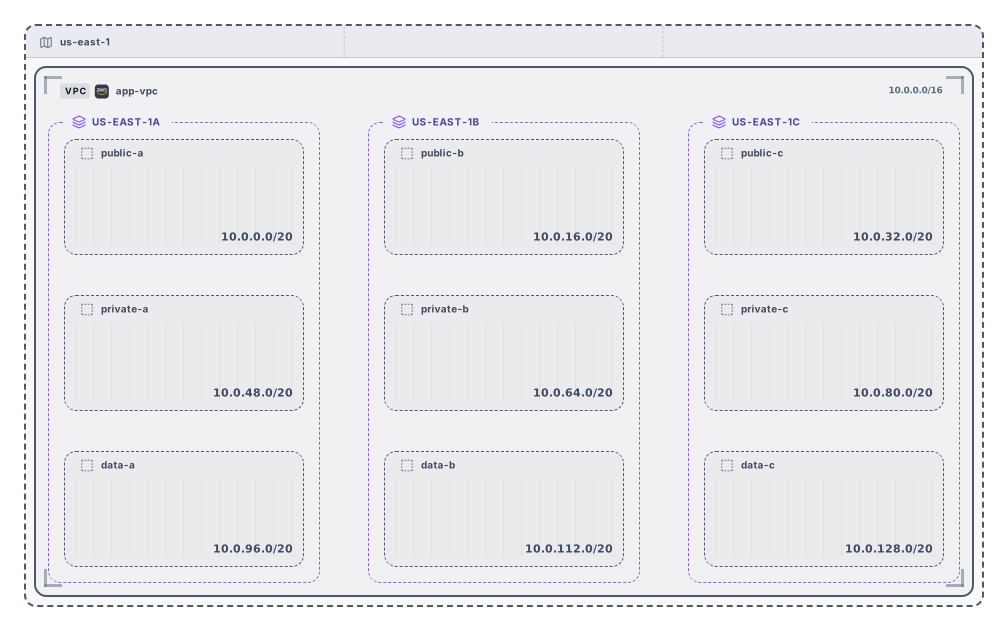
Pick a new prefix or a subnet count to list equal subnets, or send the block to the VPC planner, where the plan becomes a diagram you can download as SVG or PNG or open in Archboard. Signing up takes a Google or GitHub account.
What the subnet calculator works out
- The network address and the broadcast address of the block. If you type an address with host bits set, such as 192.168.1.77/24, the tool says so and works with 192.168.1.0/24.
- The subnet mask in dotted form, 255.255.255.0 for a /24, and the wildcard mask that access lists and OSPF configs use, 0.0.0.255 for the same block.
- The first and last usable host address, so you can see at a glance which addresses a gateway, a DHCP pool or a static server can take.
- The total number of addresses and the number of usable hosts, with the network and broadcast addresses taken out the classic way.
- A table of equal subnets for any longer prefix: each row lists the subnet, its host range, its broadcast address and its usable hosts, 64 rows per page.
- An optional cloud rule. Choose AWS, Azure or Google Cloud and the host count drops by the addresses that cloud reserves, listed one by one with their role.
Point-to-point links and single hosts
A /31 has two addresses and a /32 has one, so the classic rule would leave nothing usable. The calculator follows the common convention instead: both addresses of a /31 count as usable on a point-to-point link, a /32 names a single host, and the broadcast field reads None for both. Splitting stops at /32, because a single address can’t be divided any further.
Splitting by the number of subnets you need
Often you know how many subnets you need rather than which prefix gives them. Enter a count, for example 6, and the calculator picks the shortest prefix that yields at least that many equal subnets: /19 for a /16, which gives 8. If the block can’t hold that many, the field says so instead of picking a size that doesn’t fit.
What the subnet calculator leaves out
- Splitting IPv6 blocks. An IPv6 prefix shows its range and size, but the split table works on IPv4 only.
- Subnets of different sizes in one pass. The split table cuts a block into equal parts; for mixed sizes, use the VPC planner and change the size of each row.
- Routing, gateways and VLAN settings. The tool does the address math and doesn’t configure or check any device.
- Which addresses are in use on a real network. Nothing is scanned or pinged; the numbers come from the block you type.
Subnet calculator questions
Why does a /24 have 254 usable hosts and not 256?
A /24 has 256 addresses. The first is the network address and the last is the broadcast address, so 254 are left for hosts. AWS and Azure reserve 5 addresses in every subnet, which leaves 251, and Google Cloud reserves 4, which leaves 252. Pick a cloud rule to see the reserved addresses themselves.
What is the difference between a subnet mask and a prefix length?
They describe the same thing. A /24 prefix means the first 24 bits are the network part, and the subnet mask 255.255.255.0 writes those same 24 bits as four numbers. The calculator accepts either form and shows both, along with the wildcard mask, which is the subnet mask with every bit flipped.
How do I choose a subnet size?
Count the hosts the subnet needs today, add room to grow, and pick the smallest block that fits. A /26 gives 62 usable hosts, a /25 gives 126 and a /24 gives 254. In a cloud, subtract the reserved addresses first, and remember that load balancers and managed services take addresses too.
What happens when I open a plan in Archboard?
Nothing on this page is saved. When you plan a block as a VPC and select Open in Archboard, the diagram of that plan, with its region, VPC, zones and subnets, is saved as a new diagram in your workspace, where you can rearrange, annotate, share or export it. It’s a starting point: later changes on this page don’t update it.
Is the subnet calculator free?
Yes. Calculating, splitting and planning need no account, and neither does downloading the diagram as SVG or PNG. Opening a plan in Archboard needs a free account.
Open a canvas in a minute
Sign in with Google or GitHub. Free for a single seat. Upgrade when the team joins.