Free tool
SQL Server to ER diagram
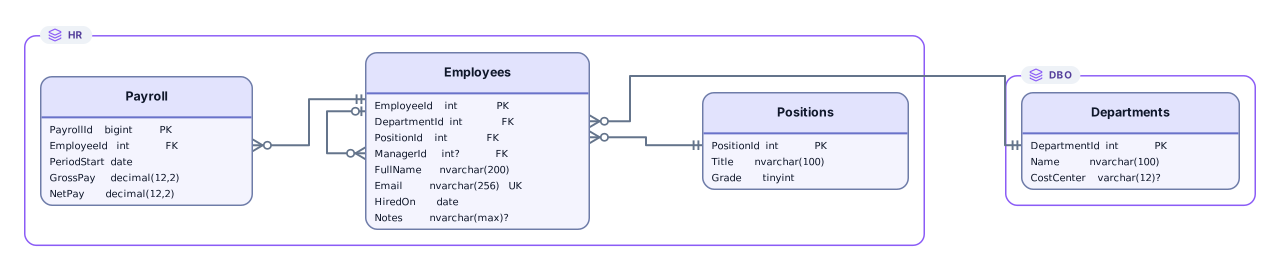
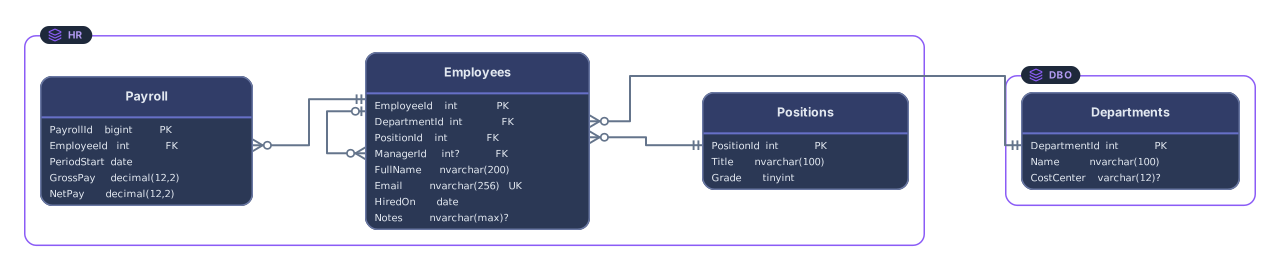
Paste a T-SQL script from SQL Server Management Studio, GO lines, [dbo] brackets, and WITH CHECK constraints included, and get an ER diagram, with a frame for each schema when the script uses several. Try the HR and payroll sample with departments, positions, and employees who report to a manager.
Example output
How it works
Paste or drop your T-SQL script
A Generate Scripts file from SSMS, Script Table as output, an EF Core migration script, or hand-written CREATE TABLE statements, with or without semicolons.
See tables and foreign keys
Every foreign key added with ALTER TABLE becomes a line between the two columns, and when tables sit in dbo, hr, and other schemas, each schema gets a frame of its own.
Open it in Archboard
Save it as a new diagram to rearrange, annotate, share a link, or export SVG and PNG. Signing up takes a Google or GitHub account.
Script the database schema in SSMS
In SQL Server Management Studio, right-click the database in Object Explorer and choose:
Pick the tables, then under Advanced keep Types of data to script on Schema only and save the script to a .sql file. For a single table, right-click it and choose Script Table as, then CREATE To.
Tasks > Generate Scripts
T-SQL syntax in a script
How each construct in a T-SQL script is handled:
[dbo].[Employees]- Read. Bracketed and double-quoted names are matched without regard to case, and dbo is taken as the default schema.
GO- A batch separator when it stands alone on a line, with or without a count such as GO 2. Statements that have no semicolon are split too.
IDENTITY(1,1)- Not shown: the column keeps its type, such as int, and the seed and increment are left off the card.
WITH CHECK ADD CONSTRAINT- Read. The foreign keys SSMS adds after the tables, with WITH CHECK or WITH NOCHECK, become relationship lines.
ALTER TABLE … CHECK CONSTRAINT- Skipped. This statement only switches on a constraint that already exists, so it adds nothing to the diagram.
ON [PRIMARY]- Skipped, together with TEXTIMAGE_ON and index options such as WITH (PAD_INDEX = OFF, …).
NVARCHAR(MAX)- Shown as the column type, like any other type with a length or precision.
IF NOT EXISTS … BEGIN … END- Unwrapped. The CREATE TABLE inside the existence checks written by EF Core idempotent scripts and by SSMS is read like any other.
What a T-SQL diagram leaves out
- Stored procedures, views, functions, and triggers. Each body is skipped up to the next GO and counted, so a table created inside a procedure isn’t drawn.
- Temporary tables such as #staging and ##shared, and table variables. They only exist while a session or batch runs, so temporary tables are left out and counted, while table variables are skipped without a count.
- Extended properties, including MS_Description texts added with sp_addextendedproperty. Descriptions aren’t read.
- Anything from a running SQL Server or Azure SQL database. No connection is made, so row counts, index usage, and diagrams saved in SSMS aren’t shown.
SQL Server questions
Which SSMS scripting options work best?
The Generate Scripts defaults work: tables come out as CREATE TABLE, and foreign keys follow as ALTER TABLE … WITH CHECK ADD CONSTRAINT, which is read. Turning on Check for object existence wraps each object in an IF NOT EXISTS test, and that reads fine too. Scripting data as well only makes the file larger, since rows are skipped.
Do I need to remove the GO lines?
No. GO is read as a batch separator, as in SSMS and sqlcmd, and so is GO with a repeat count. Scripts without GO or semicolons also work: a new statement starts at each CREATE, ALTER, or similar keyword, while phrases such as ON DELETE SET NULL stay in one piece.
How are dbo and other schemas shown?
When a script uses more than one schema, each schema with tables becomes a frame, so [hr].[Employees] sits in an hr frame next to the dbo frame, and foreign keys between schemas cross the frames. Names match without regard to case, as they do under SQL Server’s default collation.
Does it work with Azure SQL Database?
Yes. Azure SQL Database and Azure SQL Managed Instance use T-SQL, so scripts generated from them in SSMS read the same way, and so do EF Core migration scripts. Connect SSMS to the Azure server and use Generate Scripts as with any other SQL Server.
Is anything saved when I paste a script?
The preview isn’t saved. When you select Open in Archboard, the drawn diagram, with its table cards, column names and types, schema frames, and lines, is saved as a new diagram in your workspace. Later changes in SQL Server don’t update it.
Is the SQL Server ER diagram tool free?
Yes. Pasting a script and viewing the diagram need no account. Opening the diagram in Archboard needs a free account.
Open a canvas in a minute
Sign in with Google or GitHub. Free for a single seat. Upgrade when the team joins.