Use case
Retrospective boards
What went well, what to improve, and the action items that follow: a retrospective board your team can come back to at the next retro.
Scenario
An engineering team closes a two-week sprint: the new search shipped, but meetings ate the calendar, priorities were unclear, and CI builds were slow. The team has thirty minutes to agree on three changes.
Collect notes in three columns, group the themes, and turn the most important ones into action items with owners. Keep last sprint’s board one click away to compare. Share a branded public link or export SVG/PNG; Pro adds embed and watermark-free PDF/JPEG.
What you draw
Retrospective boards
- A retrospective board with went well, to improve, and action items
- One sticky note per observation
- Stickers or stamps on the themes the team picks
- Action items with an owner and a date
- An Eisenhower matrix to prioritise the action items
- Last sprint’s board on the same canvas for comparison
Why Archboard
Archboard is a hosted diagram workspace, so each retro builds on the last one: boards autosave with revision snapshots, action items stay visible, and the same canvas can hold the process or plan a change affects.
Packs on this canvas
Boards · Core · Stickers
Every built-in pack is on Free (3 diagrams, 15 diagram nodes + 150 notes, text, stickers & mind map topics each, branded public share, live editing with your AI agents). Pro adds unlimited diagrams and nodes, seats for teammates to edit live, embed, and watermark-free export ($10/seat/month).
Scope
The team can add notes at the same time and see each other’s live cursors, but there are no timers, anonymous voting, or facilitation mode; mark the themes to act on with stickers. The board autosaves and keeps revisions.
How a session goes
Start from the retrospective template after Google or GitHub sign-in
Fill the first two columns with observations, one per note
Group similar notes and mark the themes worth acting on with a sticker
Write the action items with owners and share the board link with the team
Starting template
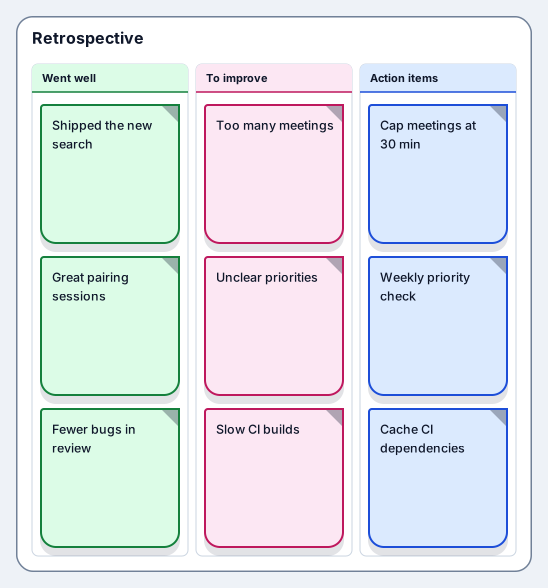
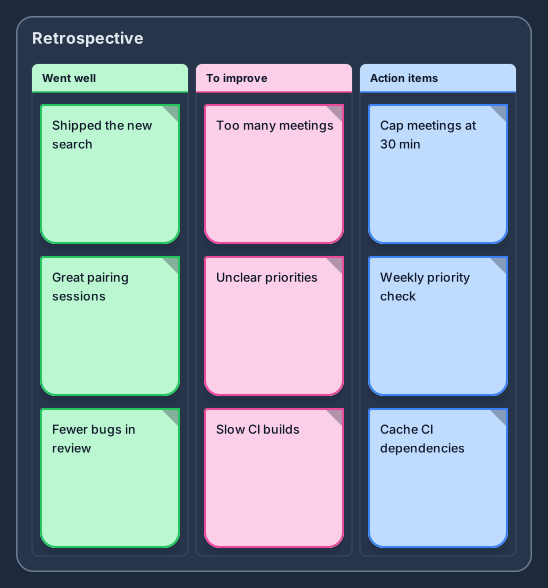
Retrospective
The Retrospective template opens three columns (went well, to improve, action items) with three sample notes in each. Replace them with your team’s notes and keep one observation per note.
Opens an editable copy in your workspace. New to Archboard? Sign in with Google or GitHub and the copy opens right after.
Retrospectives that lead to change
Most retrospectives end the same way: a wall of sticky notes, a few good ideas, and nothing different by the next sprint. The notes were never kept anywhere the team would look again, and the action items had no owner. A retrospective board on a hosted canvas fixes the follow-through. Three columns (what went well, what to improve, and action items) hold one sticky note per observation, the column under the cursor lights up as you drag a note, and the board autosaves, so the action items are still there when the next retro starts.
A good retro has a simple shape. Set the stage with one question, collect observations quietly before discussing them, group the notes that say the same thing, and spend most of the time on the few themes that matter. End with no more than three action items, each with an owner and a date, and start the next retro by checking them. The whole team can add notes at the same time with live cursors, and teammates can also add notes before the meeting; there are no timers or anonymous voting.
From one sprint to the next
The value of a retro builds over time. Keep each sprint’s board in the same workspace, save a revision snapshot when the meeting ends, and open last sprint’s board to see whether the action items moved. When the team has more actions than time, sort them on an Eisenhower matrix next to the retro board. Share a branded public link with stakeholders who want the summary, and export SVG or PNG for the sprint notes; Pro adds embed for the team wiki plus watermark-free PDF and JPEG.
Engineering teams run sprint retros on it, product teams run launch retros, and managers run project post-mortems on the same kind of board. When the format needs a change, the Boards pack in the library also has start, stop, continue, the 4Ls, and mad, sad, glad, so the team can try a different angle without leaving the canvas. Sign in with Google or GitHub, start from the retrospective template, and make the next retro the one that changes something.
Start from a template
- RetrospectiveThree columns (went well, to improve, and action items) with sample notes to replace.
- Eisenhower matrixSort the action items by urgency and importance before the team commits to them.
- Brainstorm boardRows for the problem, ideas, and next steps when one theme needs a deeper session.
Questions
Which retrospective formats are available?
The retrospective template uses went well, to improve, and action items. The Boards pack in the library also offers start, stop, continue, the 4Ls, and mad, sad, glad as ready-made boards, plus custom columns.
Is there anonymous voting or a timer?
No. Archboard has no built-in voting or timers; teams mark the themes they pick with a sticker or a stamp such as Top pick or +1. If anonymity matters, the facilitator can collect notes privately before the meeting and add them to the board.
How do we follow up on action items?
Keep the action items column short and give each item an owner and a date. Start the next retro by opening the previous board, which is still in the workspace with its revision history, and move finished items out of the way.
Open a canvas in a minute
Sign in with Google or GitHub. Free for a single seat. Upgrade when the team joins.