People
Team structure with reporting lines that rearrange as you edit
Works on the Free plan: 15 diagram nodes + 150 notes, text, stickers & mind map topics per diagram.
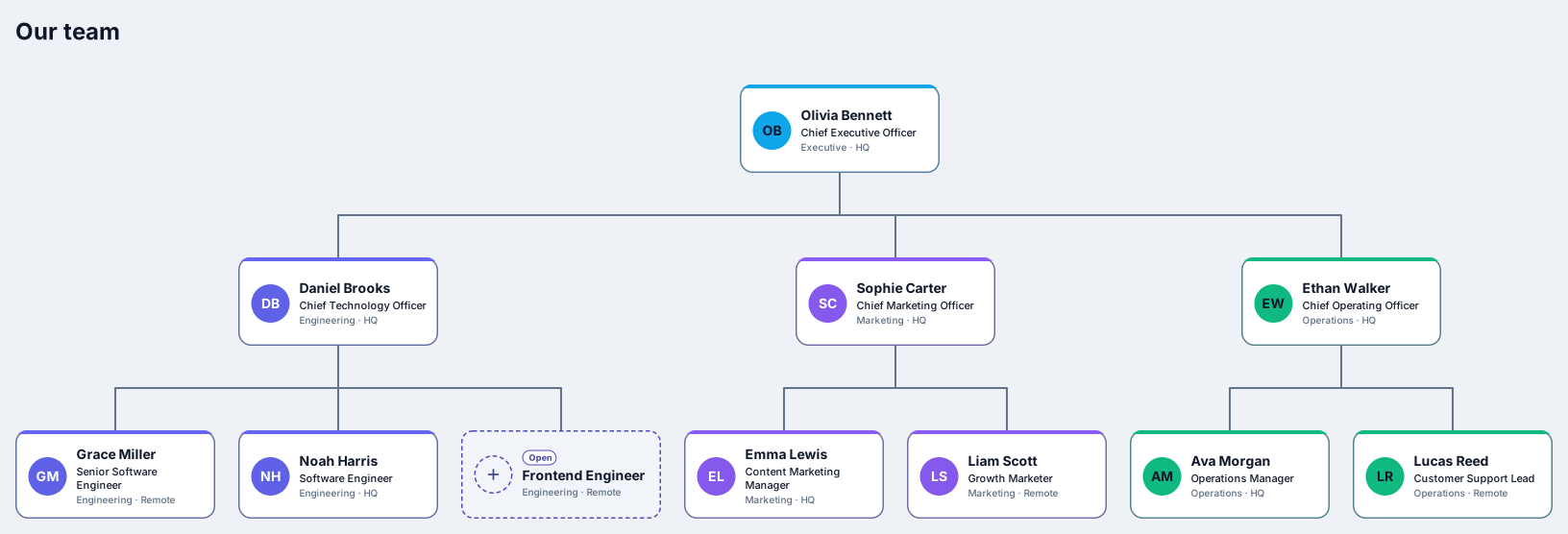
An org chart shows who works in a team and who they report to. This template opens a small company that is already laid out from top to bottom: a CEO, heads of engineering, marketing, and operations, six team members, and one open engineering position, each on a card with a name, a title, a department, and a location.
The chart arranges itself. Add a report, a peer, or a manager with the plus handles, drag a person onto someone else to change their manager, and the tree re-arranges in a single step you can undo. Departments keep their colors and open positions stay visible as dashed cards, so the chart stays readable as the team grows.
Replace the sample names, titles, and locations with your own people, starting with the person at the top.
Add new people with the plus handles: below for a report, beside for a peer, above for a manager.
Drag a card onto another person to change who they report to, and set a department to give each team its color.
Share a link or export SVG or PNG, and save a revision before the next reorganisation.
Yes. Draw a connection from the second manager to that person and it becomes a dotted line. The main reporting tree, and the layout, stay based on the first manager.
Yes. A Free diagram holds 15 diagram nodes + 150 notes, text, stickers & mind map topics, and the template uses 11 of those nodes, so you can add a few more people before you need Pro, which has no node limit.
Related use case
Org chart makerSign in with Google or GitHub. Free for a single seat. Upgrade when the team joins.