People
Agenda, action items and decisions in one place
Works on the Free plan: 15 diagram nodes + 150 notes, text, stickers & mind map topics per diagram.
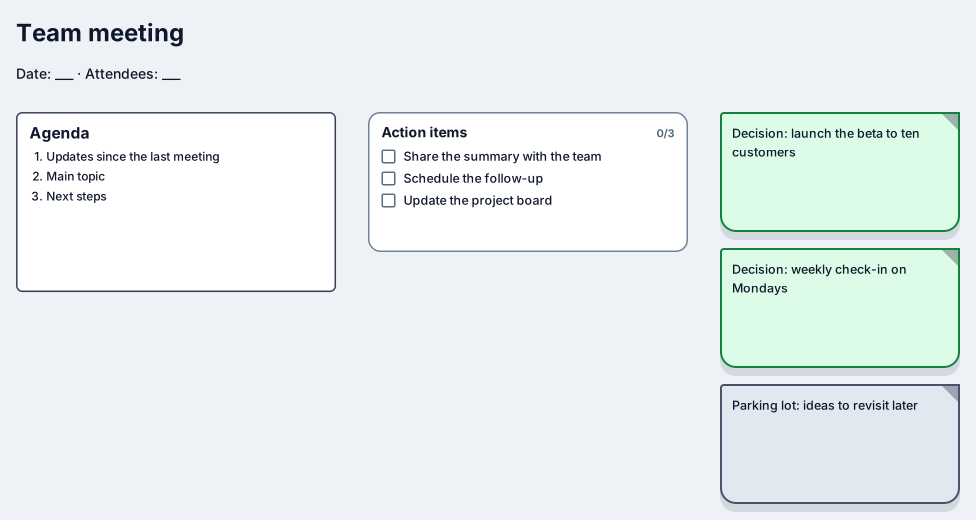
Meeting notes are useful when decisions and action items are easy to find a week later. This template lays them out on one canvas: an agenda block, a checklist of action items, green notes for decisions, and a parking lot for ideas you agreed to revisit.
The header has space for the date and attendees. Tick action items off as they get done, add a decision note every time the group agrees on something, and move side topics to the parking lot instead of letting them take over the meeting. The finished board is easier to scan than a long document.
Fill in the date and attendees, and write the agenda before the meeting starts.
Capture each decision on its own decision note so it stands out from the discussion.
Add action items to the checklist with an owner in the text, and tick them off as they are completed.
Move side topics into the parking lot, then share the board link with attendees right after the meeting.
You can, but most teams create a new diagram from the template for each meeting and keep them in one workspace. Each diagram has its own revision history and share link.
Yes. The agenda is a markdown block, so numbered lists, headings, bold text, and links work as you type.
Sign in with Google or GitHub. Free for a single seat. Upgrade when the team joins.