People
Swimlanes that show who does each step of a process
Works on the Free plan: 15 diagram nodes + 150 notes, text, stickers & mind map topics per diagram.
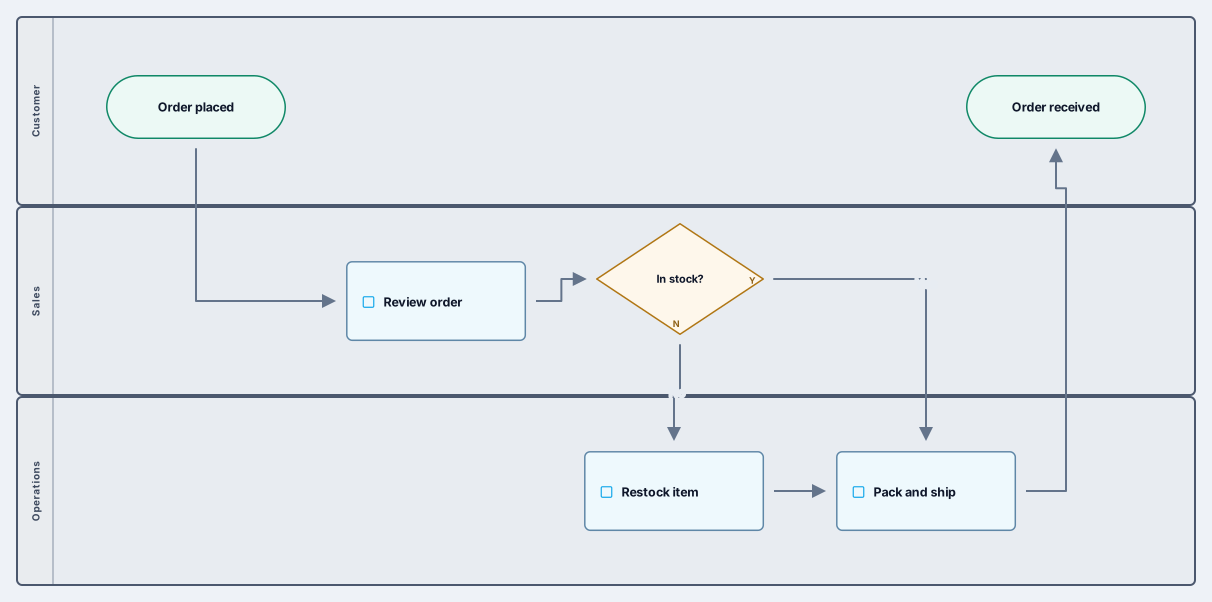
A cross-functional flowchart shows not just the steps of a process but who owns each one. This template uses three swimlanes, customer, sales, and operations, and follows an order from the moment it is placed until it is received, including a decision when an item is out of stock.
Each step sits in the lane of the team responsible for it, so hand-offs are visible as arrows crossing a lane boundary. That is usually where delays and mistakes hide. Rename the lanes for your own departments, replace the order steps with your process, and add decisions wherever the path splits.
Rename the lanes to the teams, roles, or systems involved, and add or remove lanes as needed.
Replace the sample steps with your process, keeping each step in the lane of its owner.
Add decision diamonds where the flow branches and label the outgoing arrows, for example yes and no.
Walk through the flow with each team, fix the hand-offs that cause trouble, and share the final version.
It uses BPMN pools as swimlanes and flowchart shapes for the steps and decisions, so it reads like a familiar flowchart. You can add BPMN tasks, events, and gateways from the library if your process needs them.
A plain flowchart shows the order of steps. A swimlane diagram adds ownership: each lane is a person, team, or system, so you can see who does each step and where work changes hands.
Related use case
Flowchart makerSign in with Google or GitHub. Free for a single seat. Upgrade when the team joins.